---
title: Areas in OnePlan
description: This article summarises how areas work inside OnePlan.
---
[Skip to content](https://support.oneplan.io/areas-in-oneplan#main-content)
English
Show submenu for translations
[More support](https://support.oneplan.io/kb-tickets/new?hsLang=en)
[](https://support.oneplan.io/?hsLang=en)
- [Pricing](https://www.oneplan.io/pricing/)
- [OnePlan.io](https://www.oneplan.io/)
Open main navigation
Close main navigation
- [Pricing](https://www.oneplan.io/pricing/)
- [OnePlan.io](https://www.oneplan.io/)
- English
Show submenu for translations
- [More support](https://support.oneplan.io/kb-tickets/new)
- [Contact us](mailto:help@oneplan.io)
[Contact us](mailto:help@oneplan.io)
How can we help you?
- There are no suggestions because the search field is empty.
1. [OnePlan Knowledge Hub](https://support.oneplan.io/?hsLang=en)
2. [OnePlan Objects](https://support.oneplan.io/oneplan-objects?hsLang=en)
# Areas in OnePlan
## This article summarises how areas work inside OnePlan.
An area is a two-dimensional, closed shape made up of straight line segments and nodes.
*Examples of areas in OnePlan: Crowd areas, Parking areas.*
How they work:
| **Function** | |
| --- | --- |
| Re-size by bounding box | ✅ |
| Re-size by changing measurements | ❌ |
| Rotation | ✅ |
| Change opacity | ✅ |
| Change background colour | ✅ |
| Change foreground colour | ✅ |
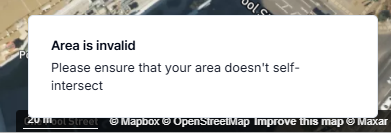
Please note, you must draw an area as a complete polygon. You cannot have an intersecting area, an error message shows if you try to do this:

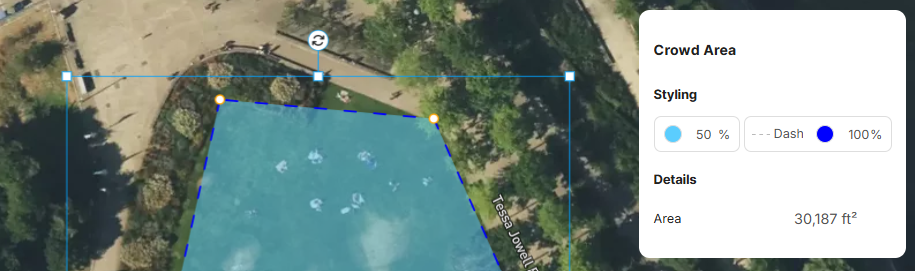
*Examples of Completed Polygons Areas*
Areas can be styled in different colours using the properties box once you click on them.
You can also use the boundary box to resize an area.
Other objects you can use in OnePlan
- [Icons](https://support.oneplan.io/one-plan-solo/icons-in-oneplan?hsLang=en)
- [Scalable Objects](https://support.oneplan.io/one-plan-solo/scaleable-objects-in-oneplan?hsLang=en)
- [Lines](https://support.oneplan.io/one-plan-solo/lines-in-oneplan?hsLang=en)
- [Getting started](https://support.oneplan.io/getting-started?hsLang=en)
- [OnePlan Features](https://support.oneplan.io/oneplan-features?hsLang=en)
- [OnePlan Objects](https://support.oneplan.io/oneplan-objects?hsLang=en)
- [Object Management](https://support.oneplan.io/object-management?hsLang=en)
- [Account Management](https://support.oneplan.io/account-management?hsLang=en)
- [Migration](https://support.oneplan.io/migration?hsLang=en)
- [FAQs & Troubleshooting](https://support.oneplan.io/faqs-troubleshooting?hsLang=en#main-content)
- [Future Developments](https://support.oneplan.io/faqs-troubleshooting?hsLang=en#future-developments)
[](http://oneplan.io)
[mailto:email@email.com](mailto:email@email.com)
Copyright © 2025, OnePlan