
To start this process, you should've had a OnePlan colleague reach out to you directly to let you know that you are ready to be migrated. You will not be able to download your events until the OnePlan Team have started the process for you. This process is staggered to ensure all users have the opportunity to migrate the events they wish to keep.
Full Migration instruction video:
How to download?
- Log into your OnePlan Classic account
- On your Event Dashboard, click the green "Download Events" button
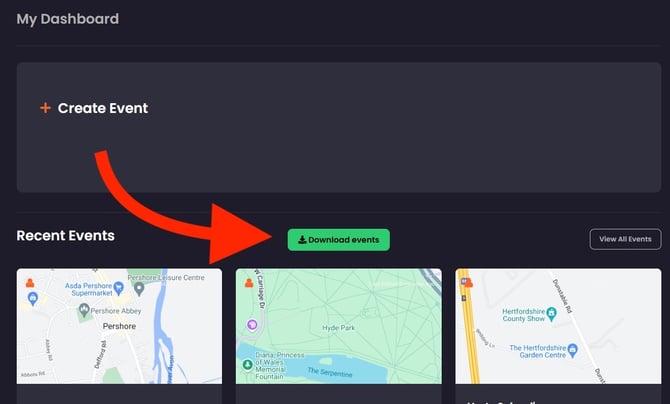
- A pop-up will appear, asking you to select which events to migrate
- All of your existing events will appear in the pop-up
- Please use the scroll bar on the right-hand side to navigate through the event list
- You can close out of the pop-up with the "x" in the top right corner
- All boxes are unticked by default. You will need to select the boxes on each event needed.
- If you tick ‘select all events’ at the top, it will automatically select all events (handy for long lists of events)
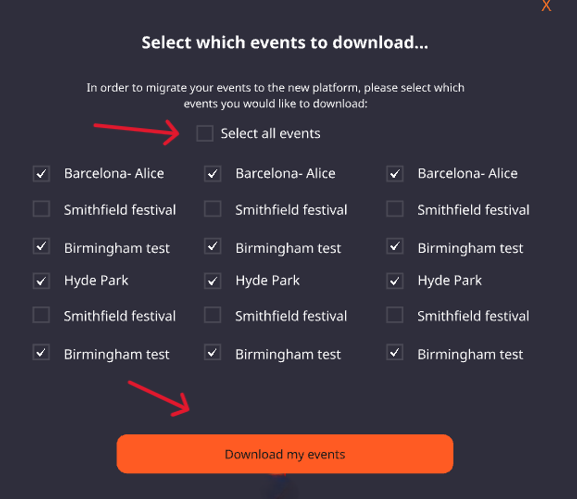
- Once your events are selected, confirm and click the "Download my events" button
- Once clicked, all selected events will start a geojson file download. A queue will appear, allowing you to see the downloading status
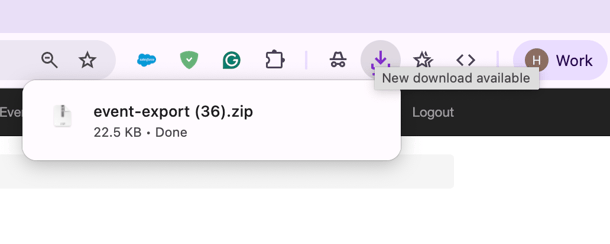
- Once the process is completed, the GeoJSON file of each of the selected events will export, and appear in your downloads file
- You will need to open up the zip file, to export the files from the zipped state. To do this simply double click on the file, or right click and extract the files.
- You can then select the event downloaded files and follow the next step in the migration process- Uploading Classic Events/Files into New OnePlan