---
title: How To Login To OnePlan
description: How to Login to OnePlan. Logging into OnePlan is a very simple process. We recommend Google Chrome or Firefox as a preferred browser. Simply go to the site app.oneplan.io
---
[Skip to content](https://support.oneplan.io/how-to-login-to-oneplan#main-content)
English
Show submenu for translations
[More support](https://support.oneplan.io/kb-tickets/new?hsLang=en)
[](https://support.oneplan.io/?hsLang=en)
- [Pricing](https://www.oneplan.io/pricing/)
- [OnePlan.io](https://www.oneplan.io/)
Open main navigation
Close main navigation
- [Pricing](https://www.oneplan.io/pricing/)
- [OnePlan.io](https://www.oneplan.io/)
- English
Show submenu for translations
- [More support](https://support.oneplan.io/kb-tickets/new)
- [Contact us](mailto:help@oneplan.io)
[Contact us](mailto:help@oneplan.io)
How can we help you?
- There are no suggestions because the search field is empty.
1. [OnePlan Knowledge Hub](https://support.oneplan.io/?hsLang=en)
2. [Getting started](https://support.oneplan.io/getting-started?hsLang=en)
# How To Login To OnePlan
## This article summarises how to log into OnePlan using an email or your Google credentials.
Logging into OnePlan is a very simple process.
We recommend Google Chrome or Firefox as a preferred browser.
Simply go to the site [app.oneplan.io](http://app.oneplan.io)
Enter your email and password or click Continue with Google to use those credentials to sign in with.
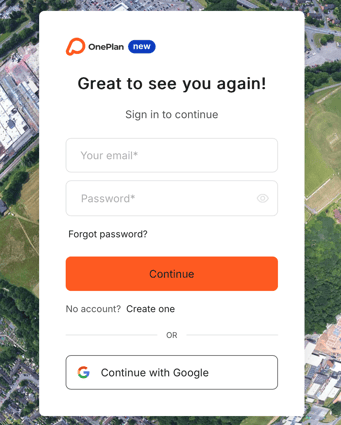
There you go. You have logged into OnePlan.
- [Getting started](https://support.oneplan.io/getting-started?hsLang=en)
- [OnePlan Features](https://support.oneplan.io/oneplan-features?hsLang=en)
- [OnePlan Objects](https://support.oneplan.io/oneplan-objects?hsLang=en)
- [Object Management](https://support.oneplan.io/object-management?hsLang=en)
- [Account Management](https://support.oneplan.io/account-management?hsLang=en)
- [Migration](https://support.oneplan.io/migration?hsLang=en)
- [FAQs & Troubleshooting](https://support.oneplan.io/faqs-troubleshooting?hsLang=en#main-content)
- [Future Developments](https://support.oneplan.io/faqs-troubleshooting?hsLang=en#future-developments)
[](http://oneplan.io)
[mailto:email@email.com](mailto:email@email.com)
Copyright © 2025, OnePlan