---
title: Line Calculations
description: This article helps understand and explain calculations when drawing with the line/route tool.
---
[Skip to content](https://support.oneplan.io/line-calculations#main-content)
English
Show submenu for translations
[More support](https://support.oneplan.io/kb-tickets/new?hsLang=en)
[](https://support.oneplan.io/?hsLang=en)
- [Pricing](https://www.oneplan.io/pricing/)
- [OnePlan.io](https://www.oneplan.io/)
Open main navigation
Close main navigation
- [Pricing](https://www.oneplan.io/pricing/)
- [OnePlan.io](https://www.oneplan.io/)
- English
Show submenu for translations
- [More support](https://support.oneplan.io/kb-tickets/new)
- [Contact us](mailto:help@oneplan.io)
[Contact us](mailto:help@oneplan.io)
How can we help you?
- There are no suggestions because the search field is empty.
1. [OnePlan Knowledge Hub](https://support.oneplan.io/?hsLang=en)
2. [OnePlan Features](https://support.oneplan.io/oneplan-features?hsLang=en)
# Line Calculations
The line tool provides accurate calculations in the properties panel when planning an event. Providing:
1- **Quantity of segments calculation**
-Available on all barriers
2- **Travel time**
-Available on pedestrian and vehicle routes
**Why:**
Line calculators for travel time, average speed, and segments (e.g. for barriers) are crucial for logistical accuracy, safety, and efficient resource allocation.
**How it works:**
- Segments:
1\) Choose any type of barrier, place on the map and open the properties panel.
2\) The quantity of segments is calculated based on the segment length you input.
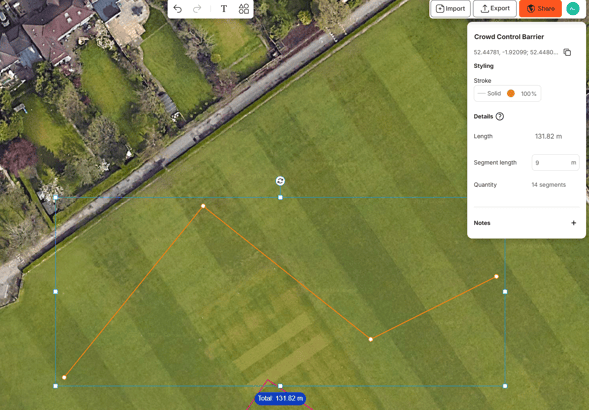
**\*Segment sizes are standard sizes based on your selected unit of measurement system, not conversions. (Feet or Meters)**
- Travel time- This is calculated as you draw your route on the map and can be seen in the properties panel.
1\) Place a pedestrian route or vehicle route
2\) The travel time recalculates based on the average speed you input.
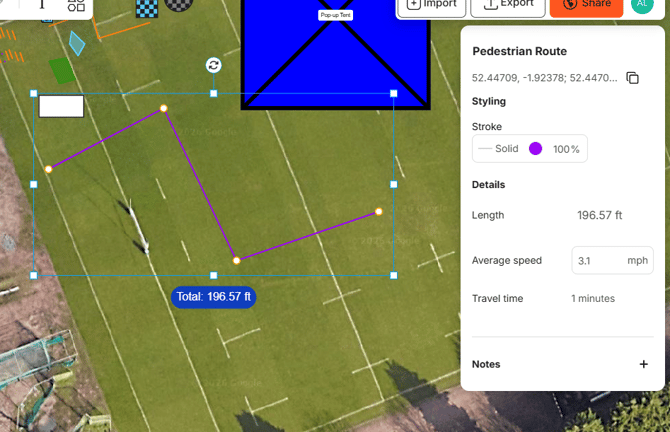
**\*The calculation is just a guide and does not take into account elevation.**
**FAQS:**
**Do the calculations account for spacing/rounding?**
We do not have a buffer for this. You will need to consider adding extra for spacing/gaps.
**Can I see these calculations in my CSV export?**
Yes- these appear as separate columns: segment length, quantity, average speed (UoM), and travel time all appear in the CSV file.
- [Getting started](https://support.oneplan.io/getting-started?hsLang=en)
- [OnePlan Features](https://support.oneplan.io/oneplan-features?hsLang=en)
- [OnePlan Objects](https://support.oneplan.io/oneplan-objects?hsLang=en)
- [Object Management](https://support.oneplan.io/object-management?hsLang=en)
- [Account Management](https://support.oneplan.io/account-management?hsLang=en)
- [Migration](https://support.oneplan.io/migration?hsLang=en)
- [FAQs & Troubleshooting](https://support.oneplan.io/faqs-troubleshooting?hsLang=en#main-content)
- [Future Developments](https://support.oneplan.io/faqs-troubleshooting?hsLang=en#future-developments)
[](http://oneplan.io)
[mailto:email@email.com](mailto:email@email.com)
Copyright © 2025, OnePlan