---
title: Object Multi-Select
description: The ability to select multiple objects at once by drawing a selection box around them.
---
[Skip to content](https://support.oneplan.io/using-object-multi-select#main-content)
English
Show submenu for translations
[More support](https://support.oneplan.io/kb-tickets/new?hsLang=en)
[](https://support.oneplan.io/?hsLang=en)
- [Pricing](https://www.oneplan.io/pricing/)
- [OnePlan.io](https://www.oneplan.io/)
Open main navigation
Close main navigation
- [Pricing](https://www.oneplan.io/pricing/)
- [OnePlan.io](https://www.oneplan.io/)
- English
Show submenu for translations
- [More support](https://support.oneplan.io/kb-tickets/new)
- [Contact us](mailto:help@oneplan.io)
[Contact us](mailto:help@oneplan.io)
How can we help you?
- There are no suggestions because the search field is empty.
1. [OnePlan Knowledge Hub](https://support.oneplan.io/?hsLang=en)
2. [Object Management](https://support.oneplan.io/object-management?hsLang=en)
# Object Multi-Select
## This article helps explain how to select multiple objects within the event plan at once, by drawing a selection box around them.
Currently, users need to select each object individually when needing to edit. This can be a long and inefficient process. Multi-select with selection box means that users can plan faster and re-size, delete and move objects at the same time.
**How it works:**
The selection tool can be activated in 2 ways.
1. Click the hand tool in the tool bar to open the dropdown, and select the "selection tool"
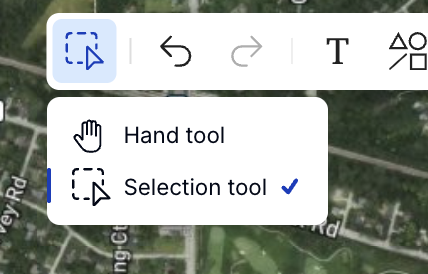
2. Press the 'S' key on your keyboard to activate the tool

Selecting objects:
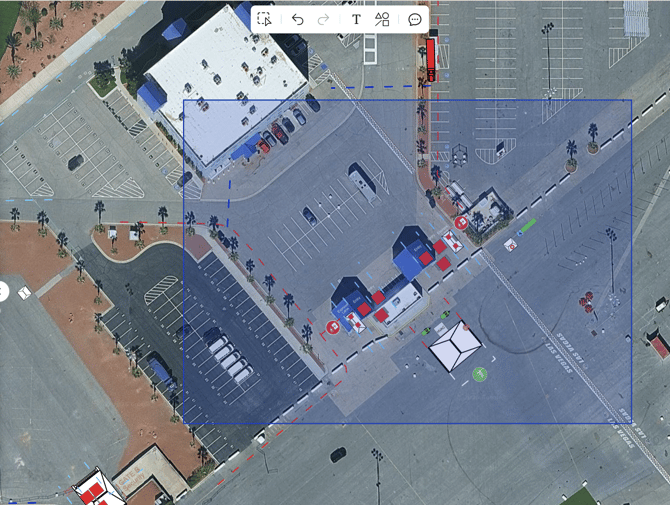
Once you have activated the tool, simply click and drag your mouse to draw the selection box. When you let go of the mouse, all of the objects inside the box will be selected.
Details:
- Locked objects will be ignored when drawn over with the selection box
- Once you have selected the objects, your mouse will switch make to the hand tool. To reactivate it - select the selection tool again or press 'S' on your keyboard
- [Getting started](https://support.oneplan.io/getting-started?hsLang=en)
- [OnePlan Features](https://support.oneplan.io/oneplan-features?hsLang=en)
- [OnePlan Objects](https://support.oneplan.io/oneplan-objects?hsLang=en)
- [Object Management](https://support.oneplan.io/object-management?hsLang=en)
- [Account Management](https://support.oneplan.io/account-management?hsLang=en)
- [Migration](https://support.oneplan.io/migration?hsLang=en)
- [FAQs & Troubleshooting](https://support.oneplan.io/faqs-troubleshooting?hsLang=en#main-content)
- [Future Developments](https://support.oneplan.io/faqs-troubleshooting?hsLang=en#future-developments)
[](http://oneplan.io)
[mailto:email@email.com](mailto:email@email.com)
Copyright © 2025, OnePlan