
What3Words is a digital addressing system that divides the world into 3-meter-by-3-meter squares. Assigning each square a unique three-word address allows for precise location identification using simple, easily communicated word combinations. These can be applied to each object you place.
Why:
It is an important feature for event planners as it enables the planner to pinpoint the exact location of an object on their event site.
How it works:
Viewing what3words
-
After placing an object, you will see the dropdown arrow in the properties panel
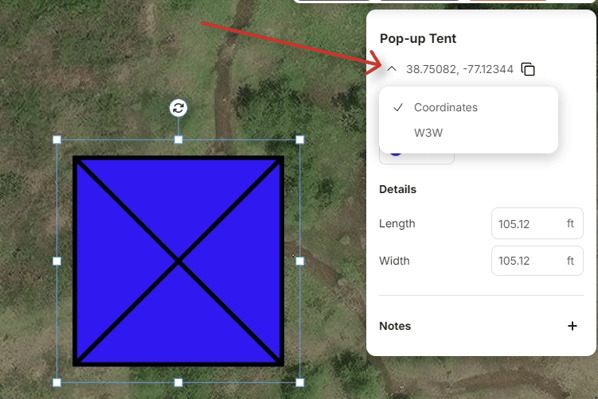 Example of the dropdown to switch between what3words and coordinates
-
Click the dropdown arrow to toggle between what3words and coordinates. Once what3words is selected you will see this displayed:
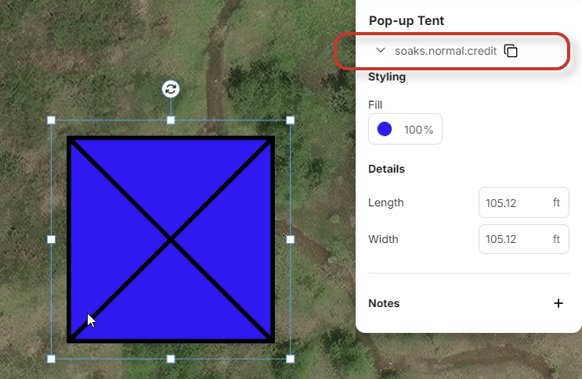 Example of what3words selected
Copying what3words
There are 3 ways to copy your what3words:
1- Copy button in properties panel. Press the ‘copy’ button and this will copy your what3words location.
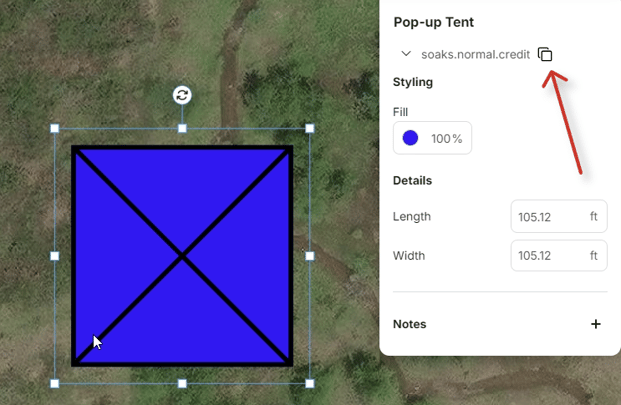 Example of where to find copy what3words
2-Via the contextual menu. Select the "Copy W3W" action from the menu
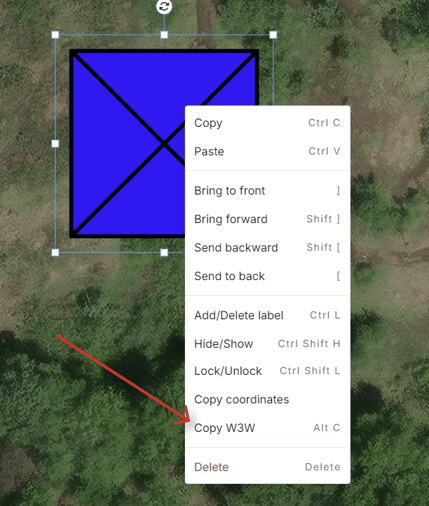 Example of copying what3words via contextual menu
3- Via keyboard shortcut. Use the shortcut "Alt + C" to copy your what3words
FAQS:
-
If what3words is selected, this feature will persist between objects. To see the coordinates, you will need to switch back using the dropdown.
-
Overlay images are excluded, so what3words isn't available for these.
-
More information about what3words can be found on this website here: ///pretty.needed.chill
Why do I see a crown icon on the feature?
This feature is paywalled for free users. You will need to upgrade your plan to a paid subscription in order to use the feature.
Can I see what3words locations in my exported CSV file?
Yes! Ensure you have what3words selected in the properties panel. When you export a CSV file, it will appear in the column ‘What3Words’.